Unable to launch #1
Assignees
 octolinkyt
Clear assignees
octolinkyt
No Assignees

Notifications
Due Date
No due date set.
Dependencies
No dependencies set.
Reference: octolinkyt/blockbreak#1
Reference in New Issue
Block a user
No description provided.
Delete Branch "%!s()"
Deleting a branch is permanent. Although the deleted branch may continue to exist for a short time before it actually gets removed, it CANNOT be undone in most cases. Continue?
After installing and downloading a version, it is unable to launch
What version? Any logs?
If you are attempting to run from a device that does not have access to mojang servers, you must manually type the version number in order to launch.
You must run the app through an IDLE like IDLE or VSCode, or the following error will appear if you double click to launch:
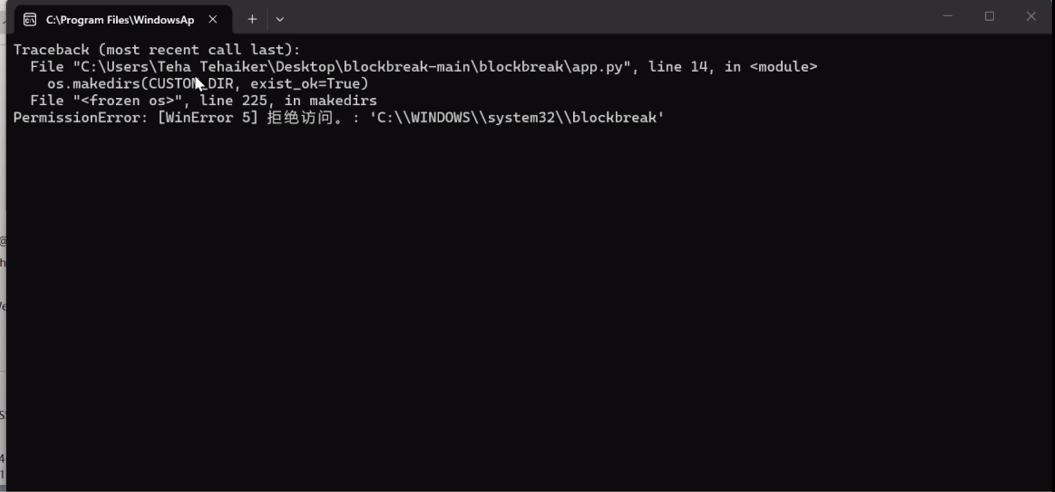
(Captured as a frame with a screen recorder since the window woule close quickly)
Running through the terminal will work, though. Recommend putting all of this into the README.
Error when running through the terminal: (6.7 MB video attached)
When you try to terminate the app through pressing Ctrl+C in terminal, an error screen will appear and for a moment, the versions load and so does the background. Then it crashes.
Could replicate above error while running in VSCode, the selection dropdown would open and close indefinitely so I had to keyboardinterrupt.
Traceback (most recent call last):
File "c:\Users\Teha Tehaiker\Desktop\blockbreak-main\blockbreak\app.py", line 216, in
root.mainloop()
File "C:\Users\Teha Tehaiker\AppData\Local\Packages\PythonSoftwareFoundation.Python.3.12_qbz5n2kfra8p0\LocalCache\local-packages\Python312\site-packages\customtkinter\windows\ctk_tk.py", line 165, in mainloop
super().mainloop(*args, **kwargs)
File "C:\Program Files\WindowsApps\PythonSoftwareFoundation.Python.3.12_3.12.2800.0_x64__qbz5n2kfra8p0\Lib\tkinter_init_.py", line 1505, in mainloop
self.tk.mainloop(n)
File "C:\Program Files\WindowsApps\PythonSoftwareFoundation.Python.3.12_3.12.2800.0_x64__qbz5n2kfra8p0\Lib\tkinter_init_.py", line 354, in _tkerror
def _tkerror(err):
KeyboardInterrupt